

Moodle Student Enrolment Automation: Streamline Registration Workflows
Payment clears or an application is accepted, then someone still enrols the student in Moodle by hand. Delayed LMS access costs refunds, support tickets, and first-week drop-off before the learner ever opens a lesson.
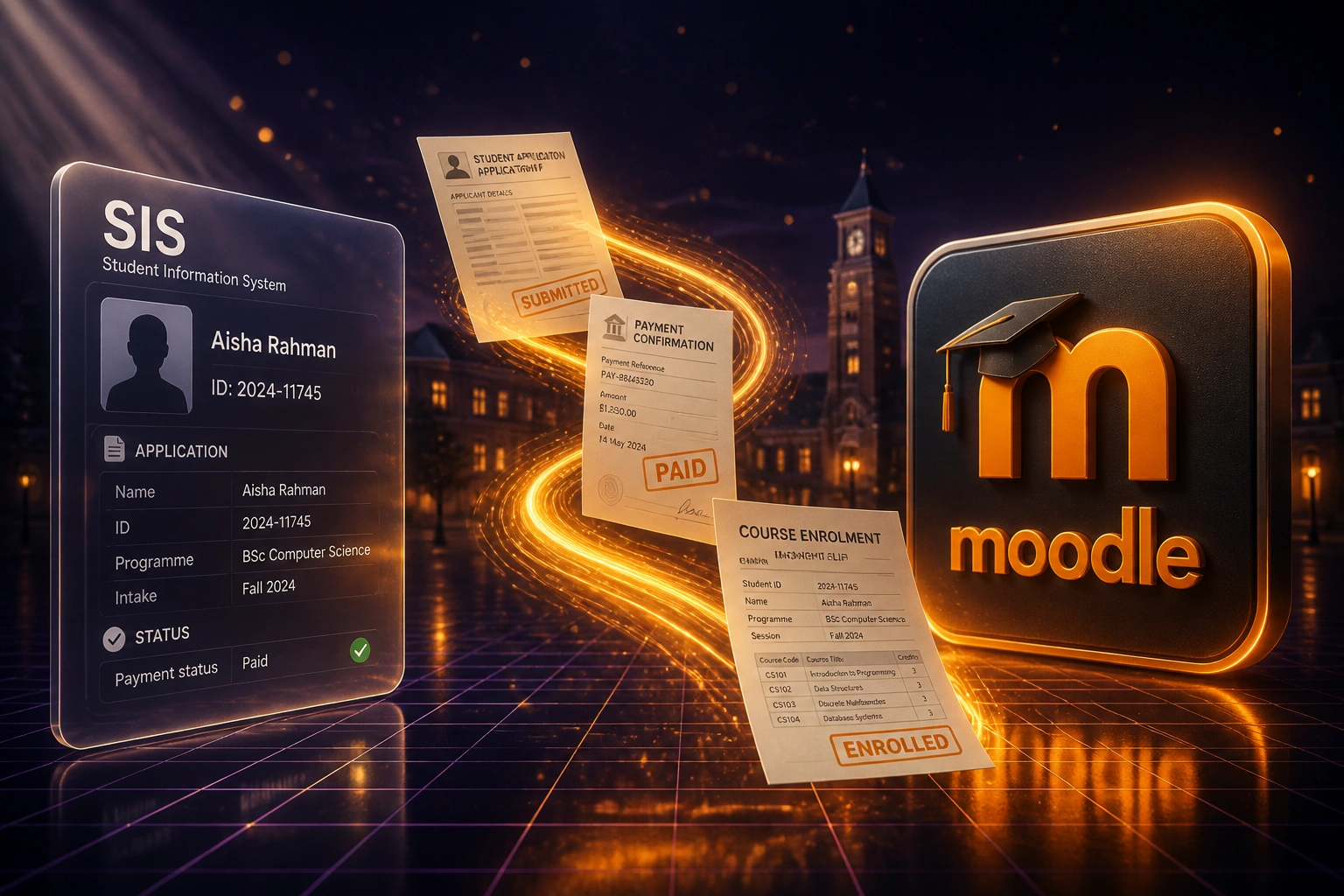
We connect forms, payments, and your SIS to Moodle course enrolment so learners get into class the same day.
Sound Familiar?
These are the exact issues training-provider and private-college ops leads face when Moodle enrolment stays manual:
- Payment clears or an application is accepted, then someone still enrols the learner in Moodle by hand
- New students wait one to three days for course access while registrar staff catch up on the queue
- Peak intake weeks turn enrolment into a backlog of support tickets and WhatsApp chases
- Wrong course, wrong cohort, or a missed enrolment means refund requests and a bruised first impression
- SIS, application forms, and PayFast or EFT confirmations never talk to Moodle, so every intake is retyped
Moodle 5.0 (April 2025) removed the enrol_mnet plugin from core and tightened enrolment plugin APIs. Sites still leaning on fragile plugin stacks or CSV uploads for peak intake are one upgrade away from a broken registration path. Moodle Web Services already support enrol_manual_enrol_users: the reliable move is payment and SIS triggers into that API, not another spreadsheet ritual.
What Student Registration Automation Actually Does
Payment or acceptance clears → Moodle enrols the learner → credentials go out. No human copying between systems.
Trigger Fires
Payment confirms, application is accepted, or the SIS marks the learner as ready to enrol
Moodle Enrols
User created if needed, then enrolled on the mapped course and cohort via Web Services
Credentials Sent
Welcome email or SMS with login details goes out the same day, not two days later
Ops Sees Status
Enrolment success or exception is logged so finance and admissions stop chasing Moodle admin
Everything You Need for Reliable LMS Onboarding
Payment-Triggered Enrolment
When PayFast, Peach, or an EFT reconciliation marks a fee as paid, Moodle creates the learner and enrols them on the right course via Web Services. No Monday morning CSV upload.
Application Form to Course Access
Accepted applications from your form or SIS push straight into Moodle student registration with programme, cohort, and role mapped correctly.
SIS Profile Sync
Name, ID number, email, programme, and custom fields stay aligned between your student information system and Moodle so support never works from a stale record.
Same-Day Course Onboarding
Learners get login credentials and course access the same day payment or acceptance clears, which cuts first-week drop-off driven by delayed LMS access.
Course and Cohort Mapping
Products, programmes, and fee codes map to the correct Moodle courses, cohorts, and enrolment methods so private colleges and training providers keep pathways clean.
Failed Enrolment Alerts
Duplicate emails, missing fields, or Moodle timeouts raise an alert so your team fixes the exception before a paid learner notices they are locked out.
Systems We've Connected to Moodle Enrolment
From 18 Hours/Week to 4 Hours/Week
How a Johannesburg private college stopped hand-enrolling paid learners into Moodle and cut first-week access tickets during peak intake.
The Manual Process
- Registrar copied paid applicants from PayFast exports and the SIS into Moodle by hand
- 12–15 minutes per learner: create user, enrol on course, assign cohort, send credentials
- Average two-day delay from payment to LMS access at peak intake
- Support flooded with "I paid, where is my login?" tickets in week one
- Wrong-course enrolments triggered refunds and angry parent calls
The Automated Process
- Payment confirmation or SIS acceptance enrols the learner in Moodle within minutes
- Registrar reviews exceptions only: duplicates, missing fields, special cohorts
- Same-day course access became the default, including during January intake
- First-week access tickets dropped sharply because credentials arrived with the receipt
- Course and cohort mapping cut mis-enrolments that used to trigger refunds
Before vs After Moodle Enrolment Automation
How It Works
From first conversation to live Moodle enrolment automation in 2–4 weeks.
Tell Us Your Setup
Which Moodle host, how applications and payments arrive today, and where enrolments currently stall.
Free Scoping Call
30-minute call to map payment confirmation, acceptance, and SIS fields to Moodle course enrolment.
Build & Test
We connect via Moodle Web Services, map courses and cohorts, and run parallel enrolments until accuracy is proven.
Go Live & Monitor
Switch off manual Moodle enrolment. Monitoring catches failed registrations before a paid learner notices.
Frequently Asked Questions
How does Moodle student enrolment automation actually work?
We connect the systems that already confirm a learner is ready (payment gateway, application form, or SIS) to Moodle Web Services. When payment clears or an application is accepted, Moodle creates the user if needed and enrols them on the correct course and cohort. Your registrar team reviews exceptions instead of retyping every registration.
Which payment and application tools can trigger Moodle enrolment?
We commonly wire PayFast, Peach Payments, bank reconciliation feeds, Google Forms, Typeform, HubSpot forms, and custom student information systems. If the tool can send a reliable confirmation and your Moodle site has Web Services enabled, we can usually drive course enrolment from that event.
Will this disrupt how facilitators and learners use Moodle?
No. Facilitators and learners keep working inside Moodle as they do today. The automation sits between admissions, finance, and Moodle admin. We run parallel testing so every enrolment is checked before you switch off the manual process.
What about duplicate learners and failed enrolments?
We match on email and agreed unique identifiers such as SA ID or student number, and we retry when Moodle is briefly unavailable. Your team only gets alerted when a record needs a human decision, not for every routine enrolment.
How does this help during peak intake season?
Peak weeks are when manual Moodle enrolment breaks first. Automation keeps same-day course access even when applications and payments spike, which cuts the support ticket surge and the refund risk that follows delayed LMS onboarding.
How much does Moodle enrolment automation cost in South Africa?
Simple one-way payment or form-to-Moodle enrolment syncs start from around R15,000. Multi-trigger setups that combine payments, applications, SIS fields, and custom course mapping typically range from R25,000 to R60,000. Most training providers enrolling 40+ learners a month see payback inside two to four months against recovered admin time and fewer access tickets.
Stop Hand-Enrolling Paid Learners into Moodle
If your registrar team is still copying payments and applications into Moodle, you are spending payroll on a delay that costs refunds and first-week drop-off.
Tell us which Moodle host you run, how applications and fees arrive today, and where enrolments stall. We will show you exactly how same-day course registration would work for your college or training provider.